spinner
{{ announcement-bar }}
{{ menu }}
{{ hero-component }}

What is CNC Macro Simulator II

CNC Macro Simulator II is a professional-grade CNC simulator widely recognized and trusted across the manufacturing industry. Designed for both experienced CNC programmers and beginners, it provides a safe, controlled environment for learning, developing, testing, and debugging advanced CNC macro and parametric programs without risking machine downtime.

Supporting Fanuc, Haas, Mazak ISO, >Yasnac, Mitsubishi, and Centroid controls, CNC Macro Simulator II is purpose-built for heavy, complex macro programming and sophisticated parametric logic. Industry professionals rely on it to validate high-level CNC programs before deployment on real machines, while beginners use it to build confidence, understand macro behavior step by step, and gain practical CNC programming skills.

By combining industry-proven accuracy, real-world control compatibility, and beginner-friendly learning capabilities, CNC Macro Simulator II serves as an essential CNC simulation tool for machine shops, manufacturers, training centers, and automation specialists seeking reliable CNC macro development and validation.
  • one-time purchase with no time limits, no subscriptions, no accounts, and no device number restrictions
  • supporting 3-axis milling machines and lathes with C & Y axis + live tooling
  • advanced macro support such as: SETVN, DPRNT and G-code and M-code custom macro call
  • a powerful debugging tool: Step forward or backward through CNC macros with real-time variable editing Read more ...
  • frequent free updates and feature upgrades
  • macro support for Fanuc, Haas, Yasnac, Mitsubishi, Centroid, Mazak ISO or Sinumerik 802D
  • works offline, does not require internet connection
  • runs on Windows, Linux, MacOS, Android and IOS
  • can be used on desktop, tablet or even mobile phone

Trusted by specialists from:

Trusted by specialists from: United States Navy, Tesla, General Motors
FANUC
HEIDENHAIN
HAAS
OKUMA
SINUMERIK
MAZAK ISO
CENTROID
YASNAC

Gallery

{{gallery}}

Advantages

Macro analyzing tool
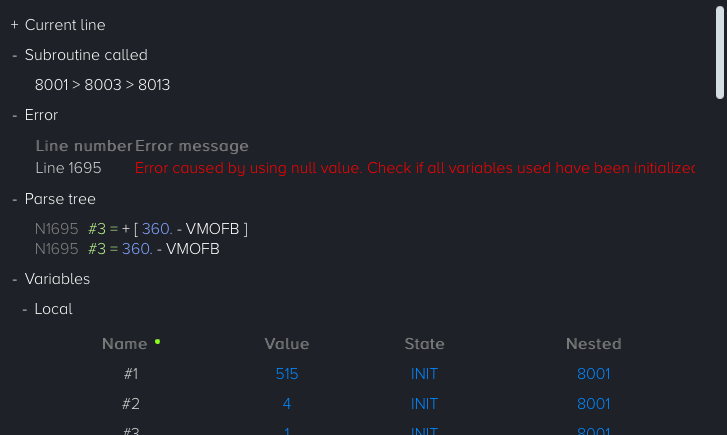
debugging fanuc macro B program
Monitor variables, their values, math and logic operations, alarms, and subroutine nesting at a glance.
Autocomplete
file-export
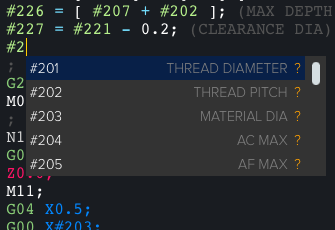
Boost productivity, minimize errors, and create custom templates tailored to your workflow.
Transfer to machine
debugging fanuc macro B program
Machine transfers now support DNC RS-232, available on desktop via Chrome and Edge browsers.
Compatibility
compatibility
Compatible with a wide range of popular CNC controls, including Fanuc, Haas, Centroid, Mazak ISO, and Siemens 802D
Multiplatform
multi-platform
Works on desktops, tablets and mobile phones and is fully compatible with Windows, MacOS, Linux, Android and IOS
Lightweight
lightweight
Hard disk space low? CNC Macro Simulator II does not need much. It takes less than 5MB (tested on MacOS)

Features

Viewport (simulator/graphics)

  • 3D tool path (mill)
  • simulation (play, play fast, stop, next, previous, rewind, reset)
  • mill - 5 view modes (3D, XY, XY removal, XZ, YZ)
  • lathe - 3 view modes (+XZ, -XZ, XC)
  • full screen support
  • adjustable simulation speed
  • measuring an object/coordinates
  • dynamic zoom, pan, and rotation features are accessible through the cursor, dedicated buttons, or keyboard shortcuts
  • show/hide rapid movement
  • machining time estimator
  • cutting length information
  • min/max for X, Y, Z axes

Debugger tool

  • assigned and created local, common and system variables
  • highlighting lines in the code editor while debugging
  • debugging options: play, play fast, stop, next, previous, rewind, reset
  • called subroutine and nesting level
  • math and logical calculations in line
  • for IF and WHILE statement shows the actual value (true or false)
  • adjustable debugging speed
  • seamless manual control over modifying local, common, and system variable values during active debugging

Code editor

  • customizable autocomplete system (available in desktop mode only)
  • stores data even if there is a power outage
  • code highlighting/indentation
  • formatting code
  • "Go to line" feature added (quickly navigate to any line with ease)
  • intelligent adding/removing line numbers (automatically updates or preserves line numbers associated with GOTO, P and Q addresses in turning cycles, Q address in a subroutine call)
  • advanced code transformation tools: move, rotate, mirror, scale, abs to rel (and vice versa), mm to inch (and vice versa)
  • comment removing
  • skip block add/remove
  • unlimited undo/redo
  • adding/removing EOB
  • decimal point adding

Advanced calculator

  • use of variables (including system ones)
  • reads the values of both common and system variables used during debugging
  • use of logical and arithmetic operators (as in Fanuc Macro B or Centroid)
  • supports Fanuc Macro B and Centroid syntax

Macro (Fanuc Custom Macro B/Haas/Centroid) support

  • keywords: IF, THEN (or TH), GOTO, WHILE (or WH), DO, END, ELSE (CENTROID), DPRNT, FOPEN, FCLOS
  • keyword shortcuts: TH => THEN, WH => WHILE
  • comparison operators (FANUC/HAAS): EQ, LT, LE, GT, GE, NE
  • comparison operators (CENTROID): ==, <, <=,>, >=, !=
  • G65/G66/G66.1 macro subprogram call
  • G-code and M-code custom macro call
  • math functions: sin, cos, tan, asin, acos, atan, sqrt, abs, round, fix, fup, ln, exp, pow
  • local, common and the most popular system variables
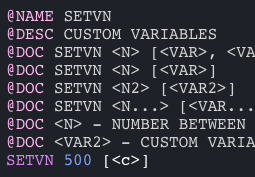
  • SETVN (Set Variable Name)

Common ISO support

  • G28, G30 and G53 (home position)
  • absolute, incremental and polar mode
  • G98 retract to initial Z value (mill)
  • G99 retract to R value (mill)
  • M98 subprogram (multiple formats)
  • repeat canned cycle (L and K)
  • circular interpolation supported by using (I, J, K or R)

Lathe support

  • absolute, incremental, polar programming
  • Direct Drawing Dimension Programming (chamfering and rounding)
  • G32/G33 thread cutting (straight and tapered)
  • G70 finishing cycle
  • G71 rough machining cycle
  • G72 facing cycle
  • G73 pattern repetition cycle
  • G74 face grooving cycle
  • G75 grooving cycle
  • G76/G78 threading cycle
  • G90 turning cycle
  • G92 threading cycle
  • G94 facing cycle

Transformation cycles

  • G16 polar coordinate
  • G51 scaling
  • G52 local work shift
  • G68 coordinate system rotation

Haas cycles support

  • G70 Bolt Hole Circle
  • G71 Bolt Hole Arc
  • G72 Bolt Holes Along an Angle

Postprocessors

  • milling mode: ISO/MACRO to plain ISO, Heidenhain iTNC 530, Sinumerik 840D/840Di/810D, Okuma (mill)
  • turning mode: ISO/MACRO to plain ISO, Okuma OSP-P300
  • Do you need a special post-processor? Contact us

Files

  • saving and opening a project (program content, information about tools, undo/redo history, work offset, machine selection, units and so on)
  • new project
  • open file (open multiple files at once)
  • append (add a subroutine under the main program)
  • import/export conversational program
  • cnc programs examples
  • save as
  • export to plain ISO, Heidenhain iTNC 530, Sinumerik 840D/840Di/810D or Okuma OSP-P300
  • file extension supported: {{ext}}

Languages

  • English, German, Polish, Chinese, Spanish, French, Japanese, Korean, Italian
{{ purchase-component }}